Fix: Net profit not updating in Master List
What you’ll learn
How to fix the most common reasons Net Profit doesn’t update in the Master List, and what info to send if you need support.
What “Net Profit sync” means
Net Profit is calculated inside the Calculator.
When the Calculator updates correctly, the Master List should show the latest Net Profit for that same product.
If the Master List shows an old number, it usually means one of these:
the Calculator changes weren’t saved
the page didn’t refresh its latest data
you’re looking at a filtered view or a different product
Step-by-step fixes (do these in order)
1) Open the Calculator using the Net Profit link
In Master List, click the Net Profit number for that product.
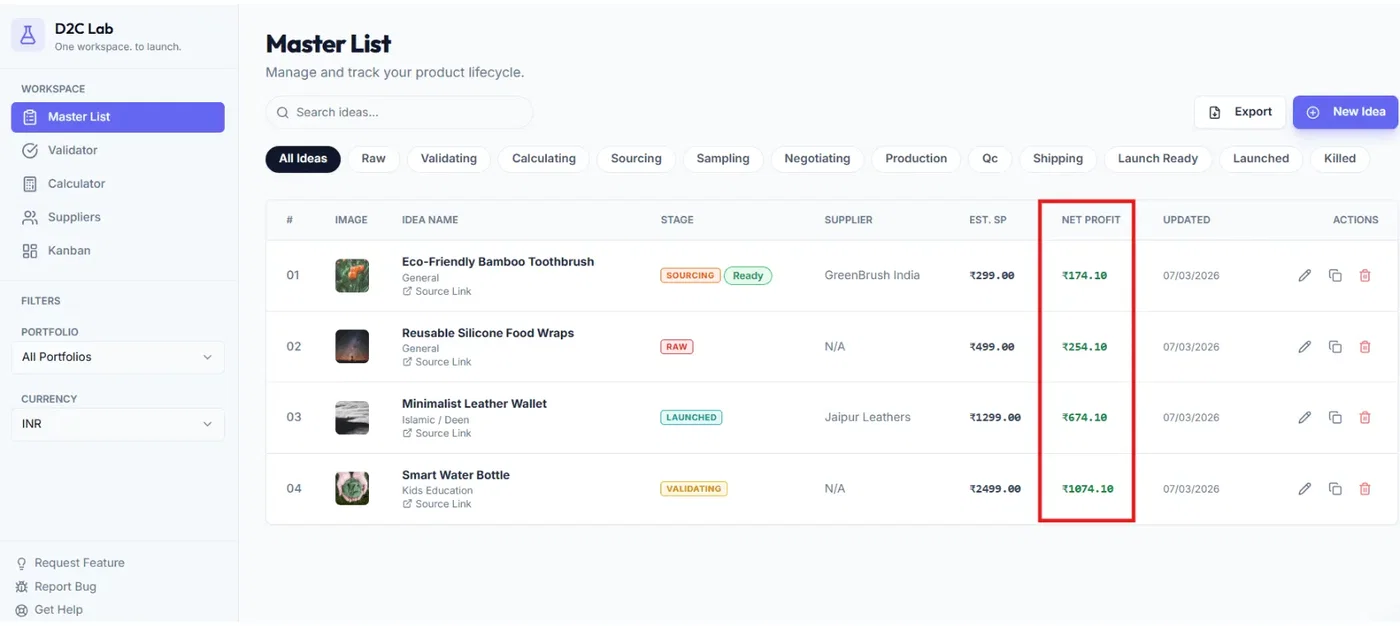
This ensures you’re opening the Calculator for the exact same idea.
2) Confirm your latest inputs are actually saved
In the Calculator:
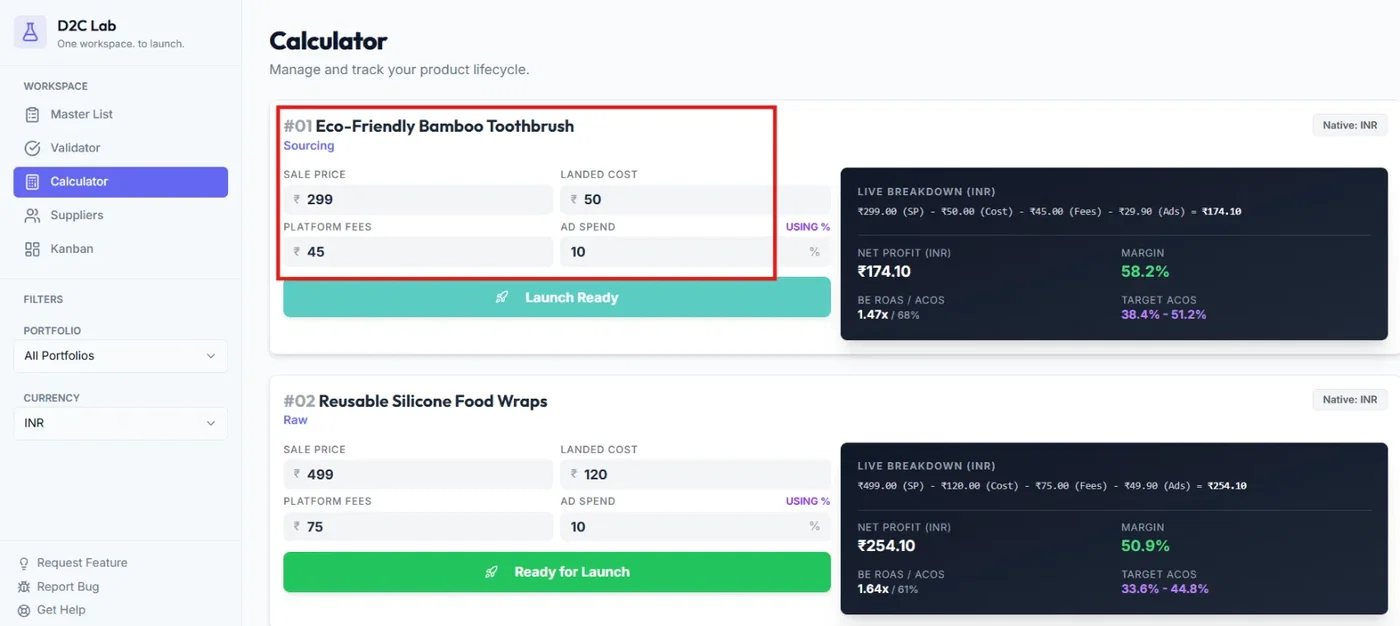
update one input slightly (example: add 1 to a cost field)
then set it back
This forces a change and helps confirm the save flow is working.
If there’s a Save button or autosave indicator, make sure it completes.
3) Refresh the Master List once
After saving in Calculator:
go back to Master List
refresh the page once
A single refresh usually fixes “stale UI” issues.
4) Check you’re in the right portfolio filter
Portfolio filters apply across tabs.
If you changed the portfolio filter recently:
switch portfolio to All
find the product in Master List
confirm the Net Profit value again
5) Hard refresh (cache refresh)
If the number still doesn’t update:
Windows: Ctrl + Shift + R
Mac: Cmd + Shift + R
Then re-check Master List.
6) Test in an incognito/private window
If it works in incognito but not in your normal browser, it’s usually a cache/session issue.
Fix:
clear site data/cookies for
d2clab.colog in again
Common causes (what’s usually happening)
Cause A: Inputs were changed but not saved
Most common.
Fix:
re-open the Calculator via the Net Profit link
make a small change
save (or wait for autosave)
refresh Master List
Cause B: You updated a different product’s Calculator
Sometimes users open a different idea card and update numbers there.
Fix:
always jump from Master List → click Net Profit → Calculator opens for the exact product
Cause C: Browser is showing stale data
Fix:
refresh once
hard refresh
try incognito
Cause D: You’re viewing a filtered list
Fix:
portfolio filter to All
confirm the product is visible and you’re checking the correct row/card
Quick checklist (30 seconds)
✅ Open Calculator from Master List Net Profit link
✅ Confirm the Calculator inputs are saved
✅ Refresh Master List once
✅ Switch portfolio filter to All and check again
✅ Try incognito
If it’s still not updating (report it)
Post this in:
feedback.d2clab.co → Bug Reports
Include:
Product name
What you changed (example: “Selling price 999 → 1099”)
What you expected vs what happened
Device + browser (example: iPhone / Safari)
Screenshot or short screen recording
Related articles
Calculator: inputs + live breakdown + net profit sync
Master List: supplier link + profit link behavior
Fix: Calculator values not saving / resetting
Login issues after payment (common fixes)