Kanban: sticky-note color dots (what they’re for)
What you’ll learn
What the small “sticky-note” color dots on Kanban cards are, why they appear only on hover, and practical ways to use them to manage execution.
What are the sticky-note color dots?
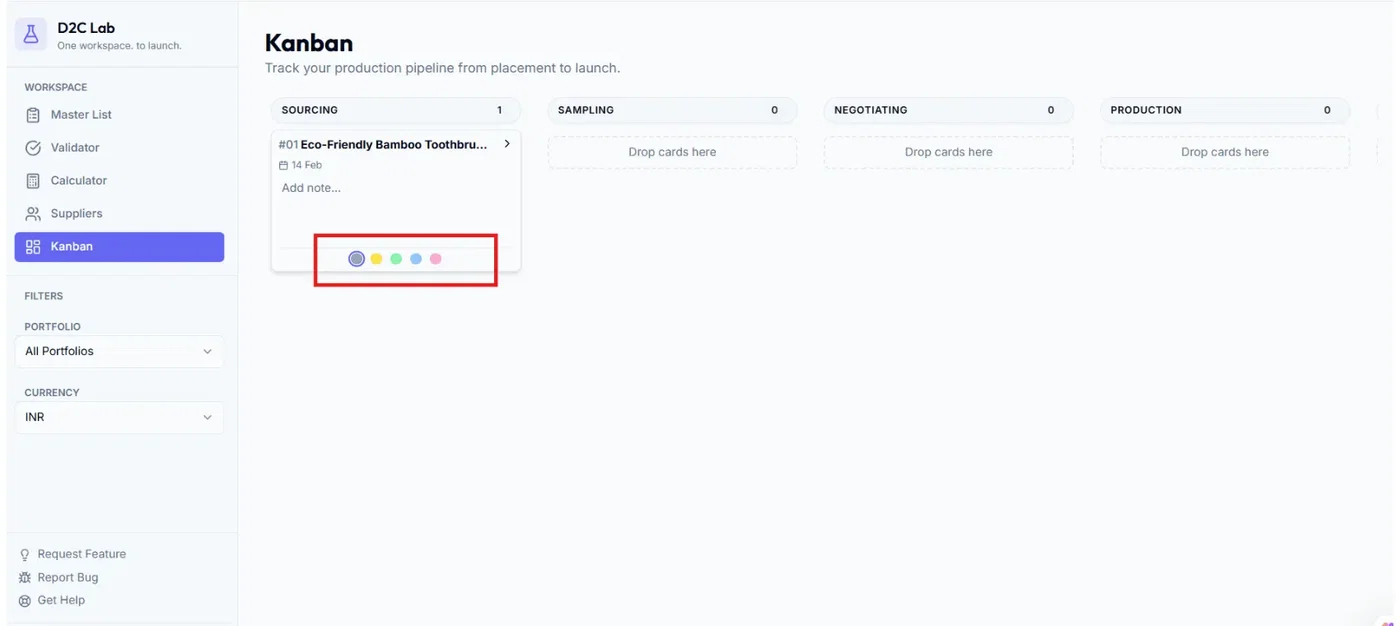
On each Kanban card, you’ll see small color dots (soft pastel colors) that appear only on hover.
Think of them as quick visual labels — like putting a small sticky note on a task card.
They’re designed to be:
lightweight (no heavy UI)
optional (use only if helpful)
fast (scan the board instantly)
Why they show only on hover
Kanban needs to stay clean.
If color labels were always visible, the board would look noisy.
So D2C Lab keeps them hidden until you hover — that way:
cards look clean by default
the labels are still available when you need them
What should the dots represent?
You can use the dots as a simple internal convention.
Here are the most useful ways to interpret them:
Option A — Priority (recommended)
Pink: High priority / urgent
Yellow: Medium priority
Blue: Low priority
Green: On track / no action needed
Option B — Blocker status
Pink: Blocked (needs attention)
Yellow: Waiting (supplier reply / shipment update)
Blue: In progress (active work happening)
Green: Clear / ready for next step
Option C — Owner/team signal (if multiple people work)
Pink: Ops / sourcing owner
Yellow: Creative / listing owner
Blue: Finance / calculator owner
Green: Founder review
Tip: Pick one meaning for your whole team and keep it consistent.
How to use them (simple workflow)
During your weekly review, hover a card and set a dot based on priority or blocker status.
Use dots to scan the board and decide what to work on first.
Clear or change the dot when the situation changes.
Best practices
Don’t overthink the colors — keep it simple.
Use dots only when it improves visibility (not on every card).
If a card is blocked, add a one-line note in the card modal explaining why.
Related articles
Kanban: columns and what each means
Kanban: card modal (history timeline + notes)
Reverting stages (moving a card backwards)
Kanban: drag-and-drop stage mapping