Kanban: columns and what each means
What you’ll learn
What each Kanban column represents in D2C Lab, what “done” looks like at each stage, and how moving cards keeps your product stage synced across the app.
What the Kanban board is
Kanban is your execution pipeline. It shows where each product is in the journey from sourcing to launch, so you always know:
what’s next,
what’s stuck,
what’s already completed.
When a card appears in Kanban
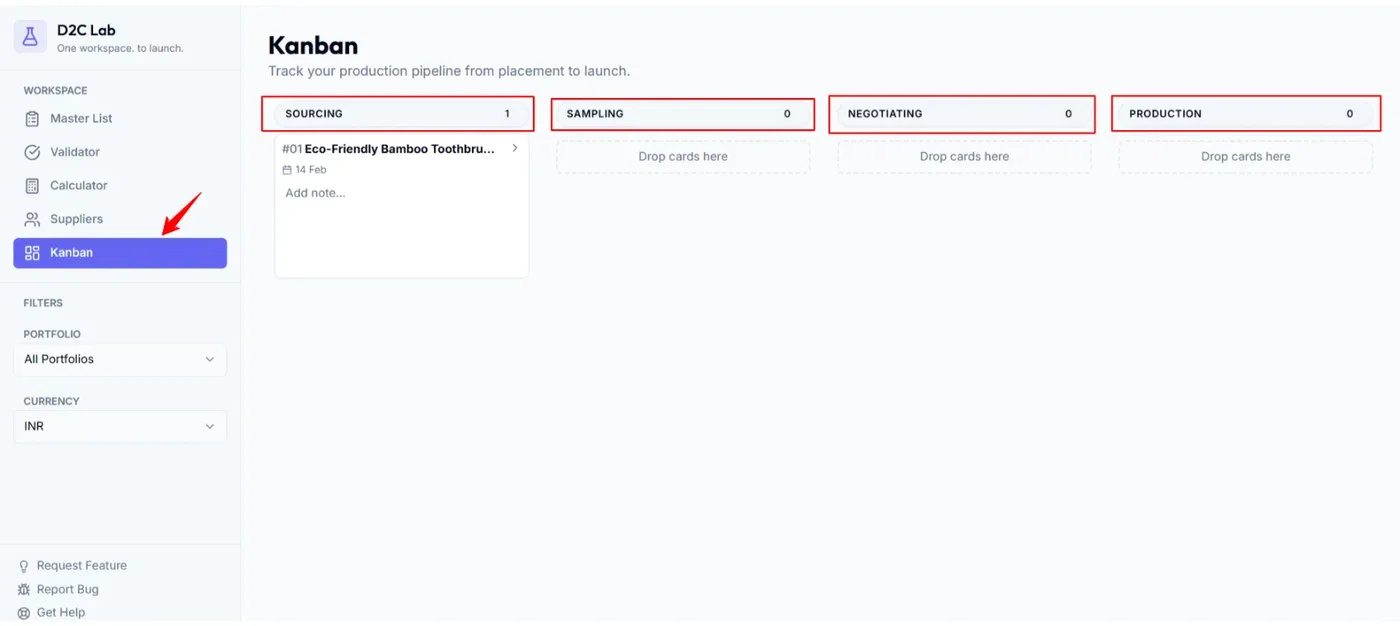
A product appears in Kanban automatically.
Rule: A Kanban card is created as soon as any supplier contact is added for that product.
The card starts in Sourcing.
The Kanban columns (in order)
D2C Lab uses these columns:
Sourcing
Sampling
Negotiating
Production
QC
Shipping
Launched
What each column means (and what “done” looks like)
1) Sourcing
Meaning: You’re collecting supplier options and quotes.
Typical actions:
add supplier contacts
request quotes
compare suppliers
shortlist options
Done when:
you have at least one serious supplier option to sample (or you’ve confirmed you’ll move forward with a supplier).
2) Sampling
Meaning: You’re requesting and reviewing samples.
Typical actions:
order samples
test quality/function
gather feedback
decide what to improve
Done when:
sample is approved (or you know exactly what changes are needed for the next sample / production).
3) Negotiating
Meaning: You’re finalizing the deal and locking terms.
Typical actions:
finalize unit cost
confirm MOQ
confirm lead time
confirm incoterms
confirm payment terms
Done when:
the supplier terms are agreed and you’re ready to place an order (or start production).
4) Production
Meaning: Manufacturing is in progress.
Typical actions:
place the order
monitor production timeline
confirm packaging/inserts
track supplier updates
Done when:
production is completed and the batch is ready for inspection/QC.
5) QC
Meaning: Inspection / quality checks are happening.
Typical actions:
inspection (self / third-party)
defect checks
approve or request rework
Done when:
QC is passed and the shipment is cleared to dispatch.
6) Shipping
Meaning: Goods are in transit (or actively being shipped to your destination / warehouse).
Typical actions:
dispatch confirmation
tracking + ETA
inbound prep (labels, inventory planning)
launch prep (listing assets, offers, marketing plan)
Done when:
inventory has arrived (or is effectively ready to sell), and you’re ready to mark it launched.
7) Launched
Meaning: The product is live and the pipeline is completed.
Typical actions:
product is live on the marketplace
sales/ads/launch activities are running
Done when:
you’ve launched (this stage is the end of the Kanban pipeline).
Stage sync (Kanban ↔ Master List)
When you drag a card between columns, D2C Lab updates the product’s stage in the Master List to match.
Moving forward updates the stage forward.
Moving backward (reverting) updates the stage backward.
This keeps one source of truth across tabs.
Best practices
Move a card only when a real milestone is done (keeps your board meaningful).
Add a one-line note when something changes (sample failed, quote updated, QC rework, etc.).
Review Kanban weekly to unblock anything stuck.
Related articles
How Kanban starts automatically (supplier contact rule)
Move through production stages (Kanban)
Reverting stages (moving a card backwards)
Launch Ready vs Launched (what each means)